The R/C Tire Selector app keeps getting better. Here’s what dropped in the latest update. Track Log Photos, Quick Add Tracks, and More Tires
Track Log Photos
You can now attach up to 2 photos when logging a race session. Snap a pic of the track conditions, your tire wear, whatever helps tell the story. Photos show up as thumbnails in the log entries and tap one to open it full-screen.
This helps when you’re looking back at what the track actually looked like when you ran that setup. “Hard packed with light dust” means different things to different people. A photo doesn’t lie.
Add a Track Without Leaving Your Log Entry
Previously, if your track wasn’t in the list, you had to switch over to the Tracks tab, add it, then come back. Now there’s a “Track not listed? + Add one” link right below the track drop-down in the New Entry form. Fill in the name, city, and country, and the app adds it to the list and auto-selects it so you can keep filling out your log without losing your place.
The app flags new user-submitted tracks for admin review, but they work immediately. Your log entries always display correctly regardless of track status.
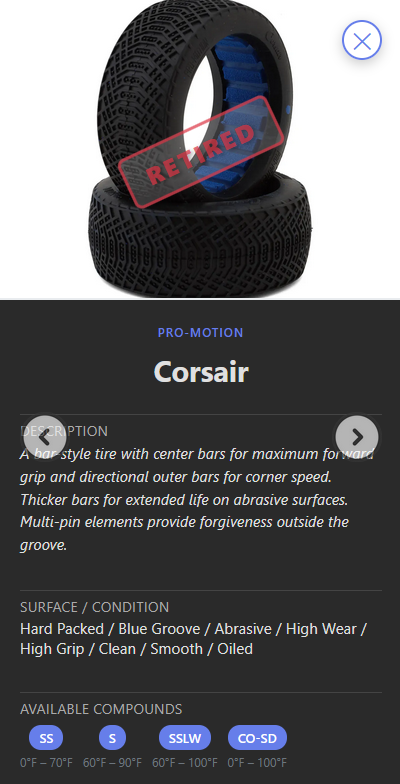
Pro-Motion Corsair Added
The database now includes the Pro-Motion Corsair bar tire. It’s discontinued, but plenty of people still run them, especially on abrasive, high-grip, oil-sealed tracks. If you’ve got Corsairs in your tire bag, they’ll now show up in your search results with full compound and surface data.
Submission Filtering Fixed
Previously, tire submissions that the admin already reviewed (approved or rejected) still showed up on the submissions page. That’s fixed now. Only pending submissions appear.
What’s Next
The community keeps growing, and the data keeps getting better. Keep logging your race sessions. Every entry makes the app more useful for everyone.
Try the R/C tire selector app now: https://tires.dodgecityrc.com
previous post: https://dodgecityrc.com/r-c-tire-selector-v2-4-now-open-to-everyone-track-log-brand-logos-more/
Leave a Reply