Author: AC Powell

  • GripGuide v3.0 Is Live

    The biggest update since launch just went live on gripguide.net.

    Driving Style Filter

    Not everyone drives the same line. Some of you stay glued to the groove every lap. Others end up in the marbles more than you’d like to admit. Both are valid, but both need different tires.

    Every tire in GripGuide now has a driving style rating, and it shifts based on what track conditions you select. Three categories:

    On the groove — Tires that reward precision. Bar tires, micro-pins, dense patterns that maximize contact patch on a prepared surface. If you go off-line on these, they pack up with debris, and you lose grip fast.

    Versatile — Tires that perform well whether you’re on the line or off it. Medium square-pin all-arounders that give you speed on the groove without punishing you when you miss it.

    All over the track — Tires designed for drivers who frequently end up off the racing line. Big spaced lugs that self-clean, dig through loose material, and keep working even when you’re not on the prepared surface.

    Here’s what makes this different from a simple label: the rating changes based on track conditions. A TZO 501 is a groove tire on a clean blue groove, but once that track gets dusty, the spaced outer lugs make it versatile. A JConcepts Reflex is versatile on hard-packed, but becomes forgiving on wet surfaces. Expand any tire, and you’ll see a full per-condition breakdown showing how it rates on every surface it supports.

    Pick your driving style, pick your track conditions, and the results actually match YOUR reality on the track.

    Tire Bag

    The old favorites heart now opens a compound picker. Tap the heart, check which compounds you own, set quantities, add notes. The “My Bag” button shows everything you’re carrying to the track, grouped by brand. If you had tires favorited before, they’re already in your bag.

    Race Events

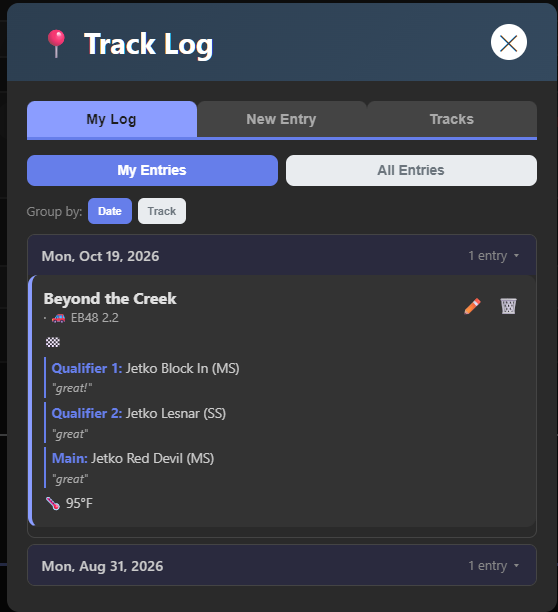
    When you log a session, you can now tag it with a race or event name. View a track and filter by event to see what everyone ran at a specific race. Event names auto-suggest from previous entries.

    Quick Add Track

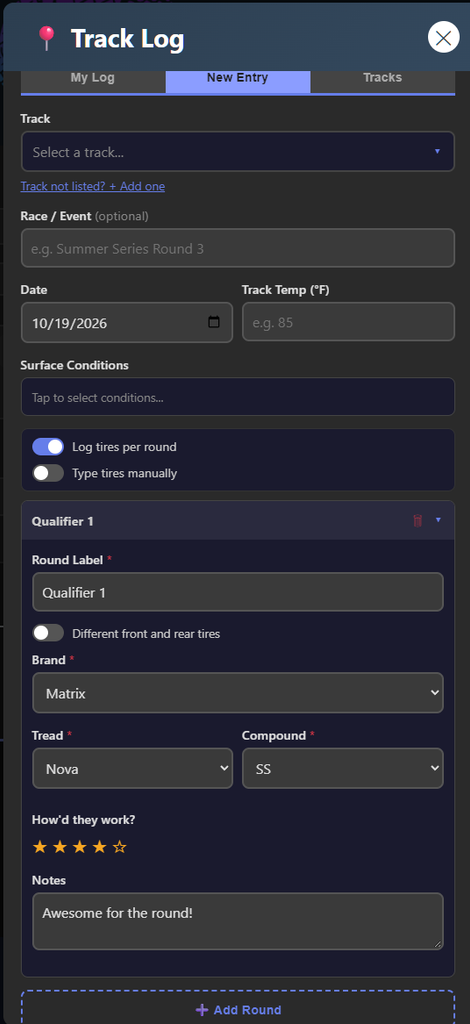
    You can now add a track inline while filling out a log entry. Tap “Track not listed? + Add one” right from the New Entry form. No more switching tabs.

    Other Fixes

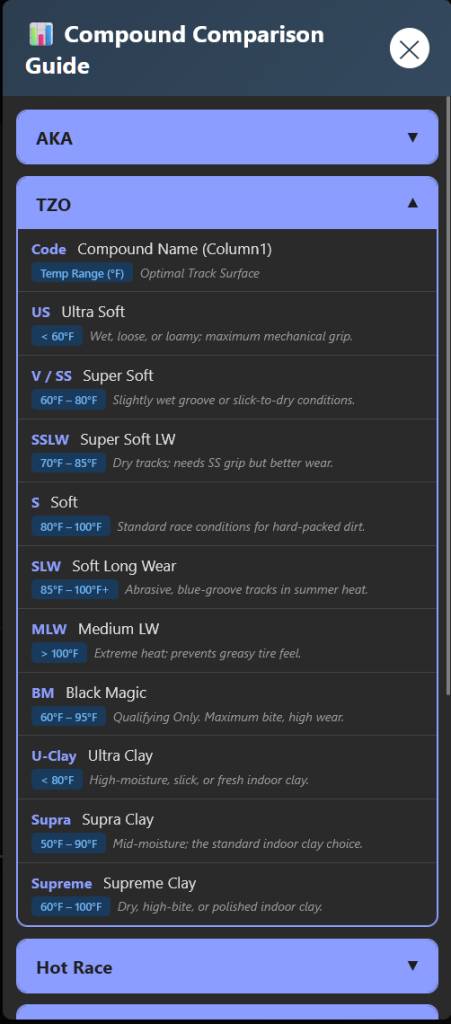
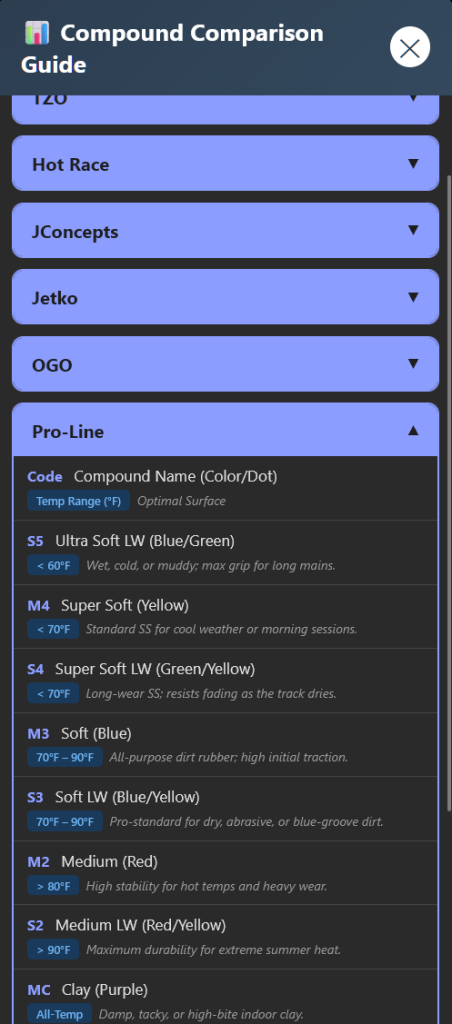
    Circle buttons no longer stretch into ovals on iOS with larger display settings. Compound guide now sorts brands alphabetically.

    gripguide.net

  • DIaled-RC Tires

    DIaled-RC Tires

    Dialed-RC Tires Added to GripGuide

    We’ve been talking to the team at Dialed-RC and their full 1/8 buggy tire lineup is now in the GripGuide database. All 8 active tread patterns, all compounds, surface recommendations, and tread photos.

    If you haven’t heard of them, Dialed-RC is designed by Gene “The Machine” Hickerson out of North Port, Florida. These aren’t rebranded imports. Each pattern was designed from scratch with specific track conditions in mind, and Gene races on them himself.

    What’s in the database:

    • V1 — The all-rounder. Dual-stage mini pin that works everywhere, especially dusty blue grooves. Gene’s “go-to” tire.
    • V3 — Random-sized mini pins with large center lugs that cut through thick dust. Serious forward acceleration.
    • V4 — Square mini pin. Think Hole Shot meets Reflex. Works on anything from wet loam to dry groove. The safe bet at a new track.
    • V5 — Built for blue grooves regardless of dust level. Easy to drive off-line. Great for indoor with clay compounds.
    • V7 — “Rattler Diamond Back” hybrid. Cuts through fluff and clears in wet. Cross between a Gridiron and Reflex.
    • V9 — Bar/pin hybrid for low-dust blue grooves. Indoor and outdoor. Massive acceleration with off-line forgiveness.
    • V11.1 — Dense pin hybrid with connecting bars. Incredible tread life. Comparable to Reflex / Double Down / Convict 2.0.
    • V12 — Bar/pin hybrid combining comfort and speed on any grooved surface. Won TQ and 1st at its debut race.

    Their compound system is different from most brands. They don’t recommend by temperature. They go by grip level and traction, and they use two different rubber materials:

    • Synthetic rubber: USS (coldest/slickest) → SS → S → MS → M (highest grip). Standard compounds for general racing.
    • Natural rubber: SSLW and SLW for clay mix tracks, CSS and CS for pure 100% clay surfaces. Long wear with a different grip feel than synthetic. All can be sauced for indoor clay or damp blue grooves.

    Everything is searchable in GripGuide now. Filter by surface conditions, and Dialed-RC tires show up alongside everything else.

    They also have V13 and V14 coming next month. We’ll add those as soon as they drop.

  • GripGuide.net  New Features in Testing

    We’ve been heads-down building, and we’re ready to let some people kick the tires (pun intended). Here’s what’s live on the GripGuide development site right now.

    Driving Style Filter & Forgiveness Badges

    This one’s been a long time coming. We tagged every single tire in the database with a forgiveness rating — Groove, Forgiving, or Versatile. Each tire card now shows a badge in the corner so you can see at a glance what kind of driver it’s built for.

    There’s a new “Driving Style” filter in the sidebar. Pick “I stay on the groove,” and you’ll see tires optimized for the racing line — bar tires, micro-pins, tight patterns. Pick “I’m all over the track,” and you’ll get all-arounders, big-pin self-cleaning tires, and anything that won’t punish you for missing the line.

    We’re not here to judge anyone’s driving. If you’re honest about where your car actually goes on the track, you’ll end up on a tire that makes you faster. A forgiving tire driven consistently beats a groove tire that’s only fast when everything is perfect.

    Tire Bag

    The old favorites heart got a full rebuild. Tap the heart now and instead of just bookmarking a tire, you pick which compounds you own and how many sets you have. Add notes if you want (“fronts are worn, rears are fresh”). The My Bag button shows everything grouped by brand — your whole pit box inventory at a glance.

    If you had favorites before, they migrated automatically. You’ll just need to fill in which compounds you actually have.

    Race Event Tracking

    When you log a session, you can now tag it with a race or event name. “Summer Series Round 3,” “Tuesday Night Points,” “RCGP 2026” — whatever you’re attending. The next person who picks that track sees your event in a dropdown, so everyone logging the same race is grouped together.

    View a track and you’ll see event filter buttons at the top. Tap one to see only the logs from that specific race. Want to know what people ran at Silver State last year? Now you can find out.

    Dev Site Access Control

    The dev site now requires an approved account. We want feedback from people who actually race and will tell us what works and what doesn’t. Create a GripGuide.net account on the main site, then reach out to request dev access. We’ll get you in.

  • GripGuide >

    GripGuide >

    Now that the webapp has a new name, I have also given it a new URL. Now you can simply go to gripguide.net.

    Why the move?

    “R/C Tire Selector” was always a mouthful. It described what the app does, but it wasn’t a name anyone would remember or tell someone about in the pits. GripGuide is shorter, easier to say, and easier to type into a browser. The new domain matches.

    The old URL (tires.dodgecityrc.com) still works — it’ll show you a page letting you know the app has moved and link you to the new site. But going forward, gripguide.net is home.

    What about my data?

    Everything came with it. Your account, your favorites, your race logs, your track log entries — all of it is already on the new server. Log in with the same username and password you always have. Nothing was lost.

    Do I need to do anything?

    If you use the app in your browser and just type in the URL, nope. Just go to gripguide.net instead.

    If you added it to your home screen (like an app), you’ll want to delete the old shortcut and add it again from the new URL. That way, you get the new GripGuide icon and name.

    iPhone: Open gripguide.net in Safari → tap the Share button (square with arrow) → “Add to Home Screen”

    Android: Open gripguide.net in Chrome → tap the 3-dot menu → “Add to Home Screen” or “Install App”

    What else is new?

    Since the last update post, a few things have been added:

    • Track Log Photos — you can now attach up to 2 photos when logging a race session. Snap the track conditions, tire wear, whatever helps.
    • Quick Add Track — if your track isn’t in the list, you can add it right from the log entry form without switching tabs.
    • My Tire Bag — the favorites system is getting an upgrade. Instead of just hearting a tire, you’ll be able to mark which compounds you own and how many sets you have. This is live on the dev build and coming to production soon.
    • Discord — there’s now a Discord server for help, feedback, and tire talk. Link is in the app footer or here: https://discord.gg/YuyNQCsR7k

    Try it now

    gripguide.net — same app, same data, better name, cleaner URL.

  • R/C Tire Selector is Now GripGuide

    The app you know at tires.dodgecityrc.com has a new name: GripGuide.

    Same tool, same URL, same tire data. Just a real name instead of a description. Easier to say, easier to share.

    What changed:

    New name and logo throughout the app
    New home screen icon if you have it installed (you may need to re-add it)
    Track Log now supports photos
    Discord server for help and feedback
    What didn’t change:

    Your account, favorites, and race logs are all still there
    All the same tire data, compounds, and surface filters
    Same URL: tires.dodgecityrc.com
    If you had the app on your home screen and want the new icon, just remove it and add it again.

    Join Discord for help: https://discord.gg/2Ye7m9MV

  • R/C Tire Selector App Update

    The R/C Tire Selector app keeps getting better. Here’s what dropped in the latest update. Track Log Photos, Quick Add Tracks, and More Tires

    Track Log Photos

    You can now attach up to 2 photos when logging a race session. Snap a pic of the track conditions, your tire wear, whatever helps tell the story. Photos show up as thumbnails in the log entries and tap one to open it full-screen.

    This helps when you’re looking back at what the track actually looked like when you ran that setup. “Hard packed with light dust” means different things to different people. A photo doesn’t lie.

    Add a Track Without Leaving Your Log Entry

    Previously, if your track wasn’t in the list, you had to switch over to the Tracks tab, add it, then come back. Now there’s a “Track not listed? + Add one” link right below the track drop-down in the New Entry form. Fill in the name, city, and country, and the app adds it to the list and auto-selects it so you can keep filling out your log without losing your place.

    The app flags new user-submitted tracks for admin review, but they work immediately. Your log entries always display correctly regardless of track status.

    Pro-Motion Corsair Added

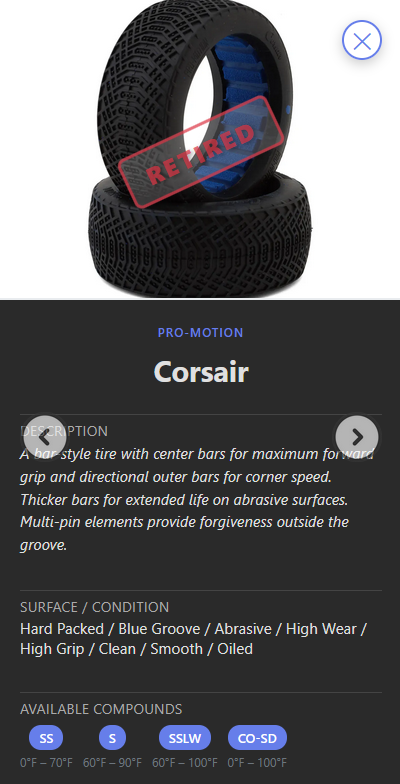
    The database now includes the Pro-Motion Corsair bar tire. It’s discontinued, but plenty of people still run them, especially on abrasive, high-grip, oil-sealed tracks. If you’ve got Corsairs in your tire bag, they’ll now show up in your search results with full compound and surface data.

    R/C tire selector app Pro Motion Corsair Tire

    Submission Filtering Fixed

    Previously, tire submissions that the admin already reviewed (approved or rejected) still showed up on the submissions page. That’s fixed now. Only pending submissions appear.

    What’s Next

    The community keeps growing, and the data keeps getting better. Keep logging your race sessions. Every entry makes the app more useful for everyone.

    Try the R/C tire selector app now: https://tires.dodgecityrc.com

    previous post: https://dodgecityrc.com/r-c-tire-selector-v2-4-now-open-to-everyone-track-log-brand-logos-more/

  • THE Series 2026 Race 1

    THE Series 2026 Race 1

    Officially kicking off the outdoor season with THE Series 2026, I was excited to get back on track, compete, and see where I stacked up.

    Saturday Mat 30th, I attended race one of THE Series 2026 @ Beyond the Creek RC Raceway. The track was super challenging this weekend, with a layout that really punished mistakes and rewarded consistency. After getting significant practice in on Friday, I came into Saturday focused on tightening up my lines and minimizing errors. By the end of qualifying, I was able to put together more consistent laps and improve my overall pace compared to earlier runs.

    I would finish the day bumping into the Double A mains in both classes. While I ended up just off the podium, I was able to stay competitive and learned a lot racing against a faster field. It was a strong step forward in terms of consistency and confidence on a difficult track, and definitely something I can build on going into the next round.

    Special thanks to Nathanial Betley and Wes Brattin for helping me dial in my setup throughout the weekend; the changes made a noticeable difference on track. Also, huge thanks to Ilan Sanderson for reglueing tires while I marshaled which kept everything running smoothly between heats. And thank you to April Thomas-Powell for coming out to support me and capture some great photos from the day.

    All in all, it was a great day at the track and to top it off, I even won a door prize.

    The next race you will see me at is most likely Race 2 of the Glass Series at TARCAR on the 20th. followed by either Race 2 of THE Series 2026 @ Finish Line RC or Race 3 of the Novi Points Series. Looking forward to carrying this momentum forward.

  • R/C Tire Selector v2.4 — Now Open to Everyone, Track Log, Brand Logos & More

    The R/C Tire Selector has come a long way since the original beta launch. What started as a simple “match tires to track conditions” tool has grown into something much bigger — and as of today, it’s open to everyone. No more beta keys.

    Here’s what’s new.

    It’s Open — No Beta Key Required

    The biggest change first: the beta key system is gone. Anyone can access the app now. Just accept the disclaimer, and you’re in. If you had a beta key before, everything still works — your favorites, your settings, everything carries over.

    Track Log — Your Race Day Journal

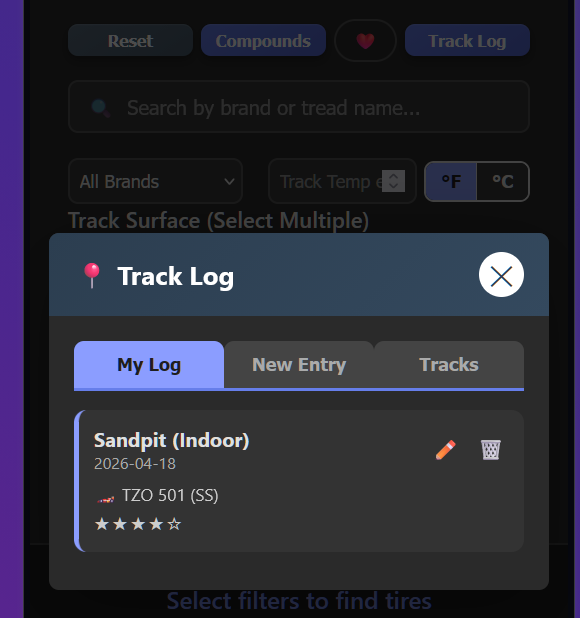
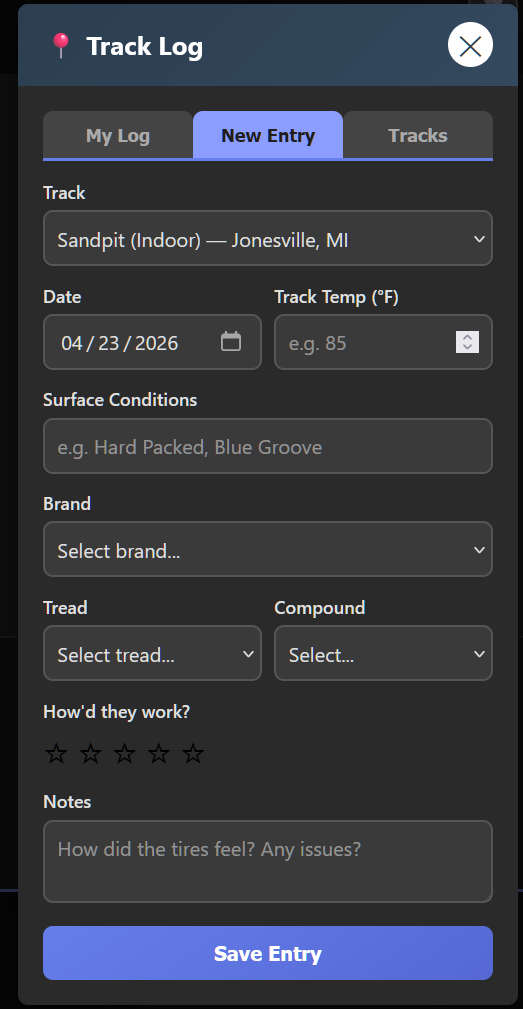
    This is the feature I’m most excited about. The new Track Log lets you record your race sessions — what track you were at, what tires you ran, the compound, track temp, surface conditions, and how they worked. Rate your setup 1-5 stars and add notes.

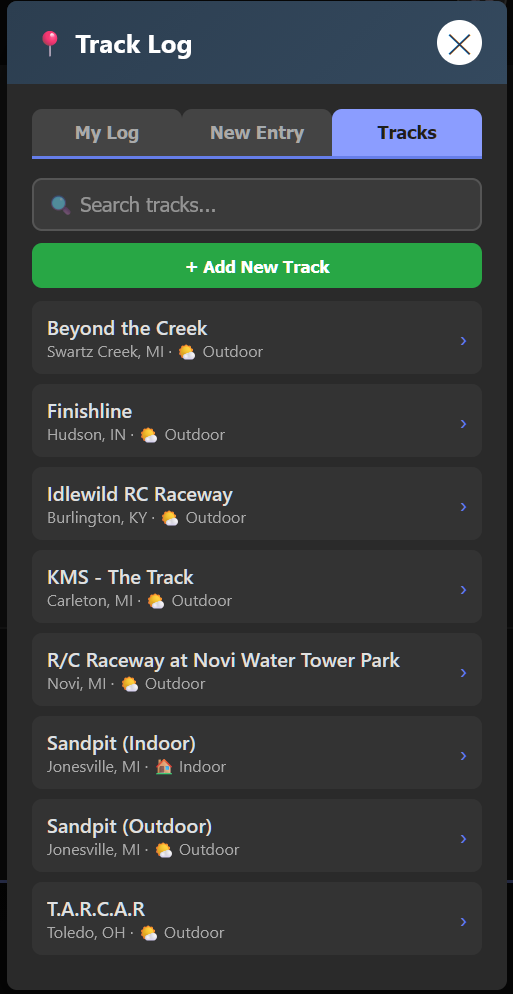
    But here’s the cool part: it’s shared. When you tap on a track in the Tracks tab, you can see what other people ran there too. Over time, this builds into a community knowledge base — before you even get to a track, you can see what tires worked for others in similar conditions.

    The tire entry is smart — pick a brand and the tread list filters to only that brand’s tires. Pick a tread, and the compound dropdown shows only that tire’s available compounds. No typing, tap.

    Tracks are shared across all users. You can add new tracks that everyone can see, and the app comes preloaded with several tracks in the Michigan/Ohio/Indiana/Kentucky area to get things started.

    Brand Logos in the Header

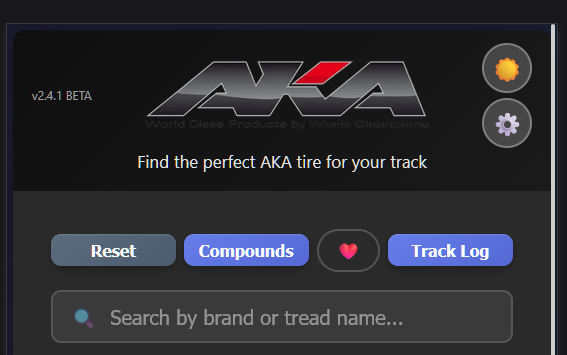
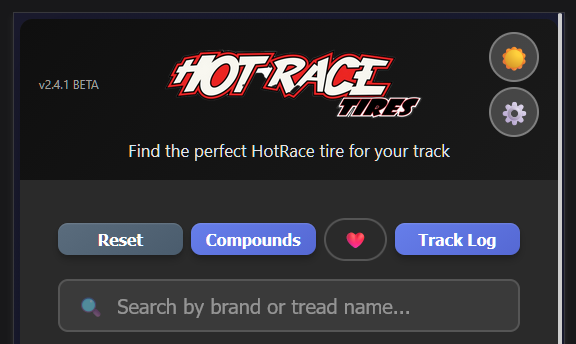
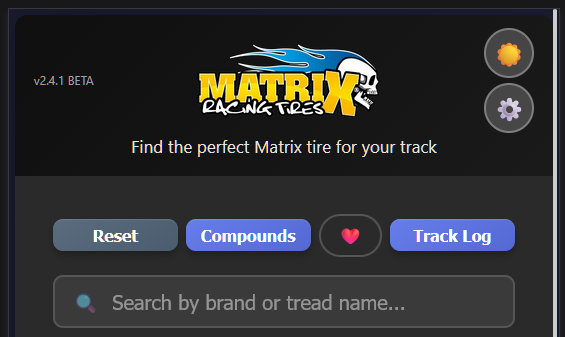
    Select a single tire brand from the dropdown, and the header transforms — the app title swaps out for that brand’s logo. It’s a small touch, but it makes the experience feel more polished, especially when you’re focused on one brand.

    Show/Hide Brands

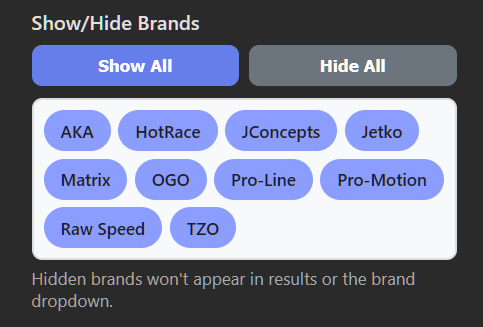
    New in Settings: a brand visibility filter. If you only run AKA and TZO, you can hide every other brand. They won’t show up in results, the dropdown, or suggestions. Tap “Hide All” then tap the brands you want — clean and simple.

    Compound Guide — Now by Brand

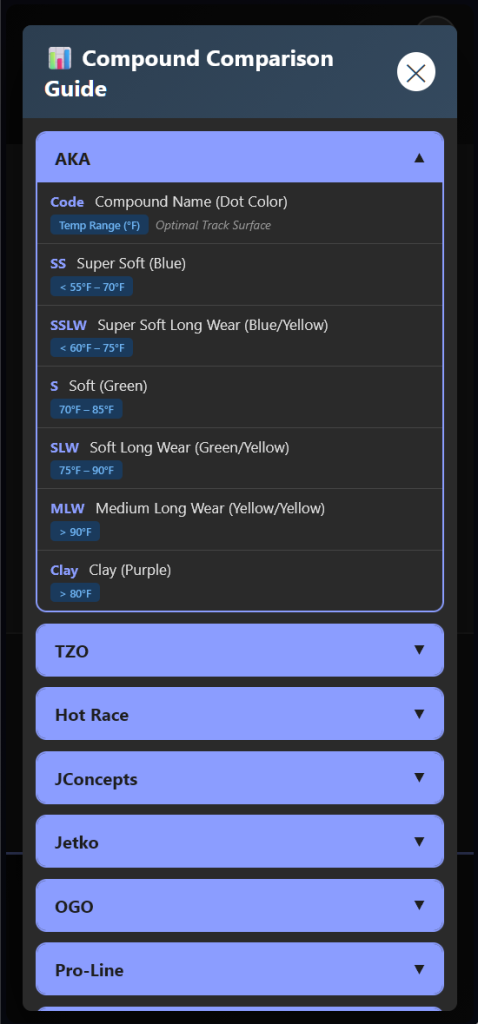
    The compound comparison chart was redesigned for mobile. Instead of showing categories (Ultra Soft, Soft, etc.) with each brand listed inside, it now shows brands as the headers. Tap a brand to see all their compounds, including codes, colors, temperature ranges, and which surfaces they’re best for.

    This is way more intuitive — racers think “what does AKA offer?” not “what does every brand call their Soft compound?”

    Raw Speed Compounds Added

    Raw Speed now has full compound data in the app with official temperature ranges straight from the manufacturer. SS, SSLW, Soft, SLW, Clay, and Gumball — all mapped with temps and surface recommendations.

    What’s Next

    The app keeps growing. On the short list:

    • Brand visibility via URL — share a link that only shows specific brands
    • Compare mode — select 2-3 tires for side-by-side comparison
    • Track condition presets — save filter combos like “Indoor Clay” for quick switching
    • Android / iPhone app — a native Play / App Store versions is in the works.

    Try It Now

    The app is live and free at tires.dodgecityrc.com

    No account needed. No beta key. Just open it and go.

    Your favorites sync automatically across sessions, and you can link multiple devices in Settings so your phone and computer share the same data.

    If you find a tire that’s missing or have feedback, there’s a “Add Tire” option right in the app.

    Let’s keep building something the R/C community actually needs. 🏁

  • Back at it!

    Back at it!

    I was finally able to do some eight scale racing this past weekend at Sandpit on their indoor track for the last nitro day points race.

    My new Tekno EB 2.2 finally started coming into its own towards the end of the day, which left me feeling good. I cannot wait for outdoor season to start.

  • Introducing the R/C Tire Selector WebApp — Find the Right Rubber for Any Track

    After a little suspense, the time has come to pull back the curtain on something I’ve been quietly building: the R/C Tire Selector WebApp — a tool designed specifically for 1/8 scale buggy racers to take the guesswork out of tire selection.

    What started as a thought experiment quickly turned into something I felt was worth actually building and sharing with the community. If you’ve ever stood at the track unsure which compound to throw on based on the conditions, this app is for you.


    What It Does

    At its core, the app lets you match tires to track conditions — fast and simply. Enter a track temperature, select your track condition, or do both. When you combine temp and condition, the app recommends a specific compound and tire. If you just pick a condition, it shows you the best tire options along with all available compounds.

    Clicking on any tire pulls up a full breakdown: recommended track conditions, available compounds, temperature ranges for each compound, and a photo of the tread pattern so you know exactly what you’re looking at.


    Current Features

    • 10 tire brands with full compound listings
    • Temperature suggestions per compound
    • Suitable track conditions for each tire
    • Tread photos for every tire in the database
    • Compound cross-reference chart — finally know what “SS” or “Green” actually means across different brands
    • Dark mode / Light mode toggle
    • Mobile-friendly version
    • Offline mode — the app works without an internet connection once enabled
    • Browse by brand — just want to see what a specific brand offers? You can do that too
    • Suggest a tire — if your favorite tire isn’t in the app yet, you can submit it

    What’s Coming

    The app is actively growing. On the roadmap:

    • Personal tire catalog to track what you own
    • Search and filter by tire name
    • Favorites and bookmarks
    • Compare mode
    • Shareable links with your current selections
    • Tire usage history and analytics
    • Track condition presets
    • Compound availability checker
    • Tire use history by track

    Want Early Access?

    The app is currently in beta and not yet open to everyone — but I’m actively looking for testers to kick the tires (pun intended) and give feedback. If you want to get your hands on it early, reach out and I’ll send you a beta code.

    Let’s build something the R/C community actually needs. 🏁

    Video of the app working coming soon!