Category: GripGuide

  • GripGuide v3.2: Per-Round Tire Logging for Race Day

    GripGuide v3.2: Per-Round Tire Logging for Race Day

    Race day is never one setup. You roll off the trailer on one tire in the morning, the track comes in by the second qualifier, and by the main it has dried out and blown off the edges. Until now, GripGuide let you log one tire per entry. With v3.2, you can log the whole day, round by round, in a single entry.

    Here is what is new.

    ๐Ÿ Per-Round Tire Logging

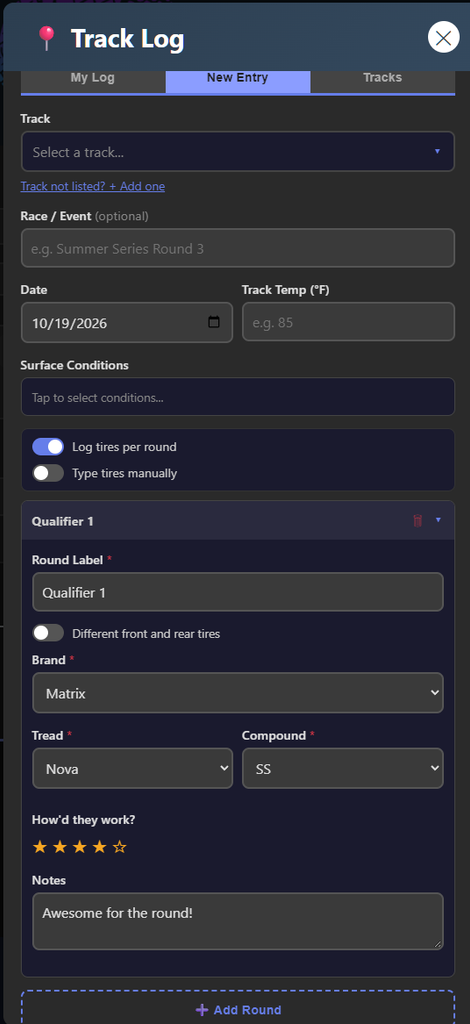
    Open the Track Log, start a New Entry, and flip on Log tires per round. Instead of a single tire, you now get a block for each round of the day. Add one for practice, each qualifier, and the main. Every block is its own little log.

    Each round carries its own:

    • Tire and compound for that round
    • Front and rear stagger, if you ran different tires front to back
    • Star rating for how it worked that round
    • Notes for what you felt and what you changed

    Label each block however you want. Practice, Qualifier 1, Qualifier 2, A-Main, it is a free text field with quick suggestions, so it matches how your club actually runs the day.
    ๐Ÿ“ˆ See the Whole Day in One View

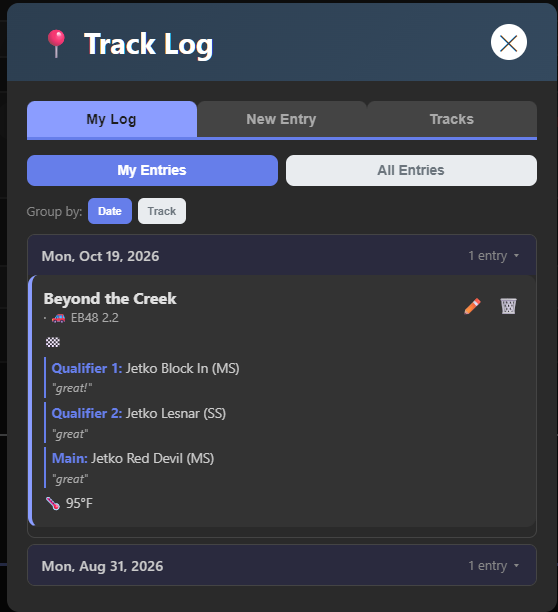
    When you open the entry back up, the full day is right there. Every round is stacked in order with its tire, compound, rating, and notes, so you can see exactly how your setup moved as the track changed. No more guessing next time you hit that track in similar conditions. You have your own progression to look back on.
    โœ… Quick Logs Still Work the Same

    If you just want to drop a single tire and move on, nothing changed. Leave per-round mode off and the form works exactly like it always has. Per-round is there when you want it, out of the way when you do not.

    ๐Ÿ’ก Why This Matters

    The real value of the Track Log grows every time someone logs a real session. Per-round logging makes each entry tell the full story of a race day instead of a single snapshot. The more you log, the more useful your history becomes when you are staring at a changing track and trying to decide what to bolt on next. Future you will thank you.

    ๐Ÿ”ง Try It Now

    GripGuide is live and free at gripguide.net. No account needed. Open the Track Log, start a New Entry, and flip on per-round the next time you are at the track.

    If a tire is missing or you have an idea for what to add next, there is a submit option right in the app. Let’s keep building something the R/C community actually uses. ๐Ÿ

  • GripGuide v3.1 Is Live

    GripGuide v3.1 Is Live

    The latest GripGuide update is here, and a lot has shipped since the last one. Here is everything new on gripguide.net, from fresh tires to a round of fixes that make the app smoother on your phone. If you missed the bigย v3.0 update, catch up here.


    ๐Ÿ” A Faster Track Picker

    Finding your track in the Track Log used to mean scrolling a long dropdown, and on a phone those longer track names got cramped and hard to read. Now there is a full width search box. Tap the track field, start typing, and your track filters up instantly. You touch this every time you log a session, so making it fast and clean was worth doing right.

    ๐Ÿ“ Smoother Pop-Ups

    If you have ever opened a window in the app on your phone and watched it jump around or cut off the bottom while scrolling, that is fixed. Pop-ups now size to your actual screen and stay put. It hit everything: the Track Log, the Compound Guide, and Settings all feel more solid now.

    ๐Ÿ“Š A Cleaner Compound Guide

    The compound comparison chart got a real tidy-up. Brands are now listed alphabetically, and every brand reads the same direction, softest at the top down to hardest at the bottom. Comparing compounds across brands is a lot easier to follow now. The whole compound dataset also moved to a faster format behind the scenes.

    ๐Ÿท๏ธ New Tires

    The lineup keeps growing. Added since the last update:

    • AKA Reverb
    • Pro-Line Vandal
    • DIALED-RC V13 and V14
    • HotRace Tokyo, the tire that just won the IFMAR Nitro Buggy World Championship
    • TZO 403, plus the new TZO Double Green compound

    Every one is tagged with the surfaces and compounds it is built for, so GripGuide can match it to your conditions.

    ๐Ÿ” Smarter Account and Sync Fixes

    Logging in is more reliable now. The app handles expired sessions cleanly, so you will not get stuck with a silent login failure that leaves your track logs looking empty. Log in again and everything syncs back the way it should.

    โšก Faster, More Shareable, Easier to Find

    A few under-the-hood wins: the app now shows a proper preview image and description when you share a GripGuide link, so posts look sharp instead of blank. The tire and compound data loads faster. And the whole thing is friendlier to search engines now, which helps new racers find it.


    ๐Ÿ”ง What’s Next

    Still in the works: logging a different tire setup for each round of a race day, so you can track what you ran in your heats versus your main. More in the next GripGuide update.

    Try it all at gripguide.net, and let me know what you would like to see next.

    October 15, 2026

  • GripGuide >

    GripGuide >

    Now that the webapp has a new name, I have also given it a new URL. Now you can simply go to gripguide.net.

    Why the move?

    “R/C Tire Selector” was always a mouthful. It described what the app does, but it wasn’t a name anyone would remember or tell someone about in the pits. GripGuide is shorter, easier to say, and easier to type into a browser. The new domain matches.

    The old URL (tires.dodgecityrc.com) still works โ€” it’ll show you a page letting you know the app has moved and link you to the new site. But going forward, gripguide.net is home.

    What about my data?

    Everything came with it. Your account, your favorites, your race logs, your track log entries โ€” all of it is already on the new server. Log in with the same username and password you always have. Nothing was lost.

    Do I need to do anything?

    If you use the app in your browser and just type in the URL, nope. Just go to gripguide.net instead.

    If you added it to your home screen (like an app), you’ll want to delete the old shortcut and add it again from the new URL. That way, you get the new GripGuide icon and name.

    iPhone: Open gripguide.net in Safari โ†’ tap the Share button (square with arrow) โ†’ “Add to Home Screen”

    Android: Open gripguide.net in Chrome โ†’ tap the 3-dot menu โ†’ “Add to Home Screen” or “Install App”

    What else is new?

    Since the last update post, a few things have been added:

    • Track Log Photosย โ€” you can now attach up to 2 photos when logging a race session. Snap the track conditions, tire wear, whatever helps.
    • Quick Add Trackย โ€” if your track isn’t in the list, you can add it right from the log entry form without switching tabs.
    • My Tire Bagย โ€” the favorites system is getting an upgrade. Instead of just hearting a tire, you’ll be able to mark which compounds you own and how many sets you have. This is live on the dev build and coming to production soon.
    • Discordย โ€” there’s now a Discord server for help, feedback, and tire talk. Link is in the app footer or here:ย https://discord.gg/YuyNQCsR7k

    Try it now

    gripguide.net โ€” same app, same data, better name, cleaner URL.